谷歌官方公佈 Chromebook, 首批將由三星(Samsung)和宏基(Acer)供應, 於6月15日在美國,英國,法國,德國,荷蘭,意大利和西班牙發售。
詳情:
- A new kind of computer: Chromebook
2011年5月12日星期四

2011年5月11日星期三
Display.getRotation()
API level 8, Android 2.2, android.view.Display 類提供 getRotation() 函數, 它返回屏幕的“自然“旋轉方向。

測試這個功能, 需要啟用自動旋轉屏幕(Auto-rotate screen)功能.
相關文章:
- OrientationEventListener(方向事件監聽器)

測試這個功能, 需要啟用自動旋轉屏幕(Auto-rotate screen)功能.
package com.AndroidOrientation;

import android.app.Activity;
import android.content.Context;
import android.hardware.SensorManager;
import android.os.Bundle;
import android.view.Display;
import android.view.OrientationEventListener;
import android.view.Surface;
import android.view.WindowManager;
import android.widget.TextView;
import android.widget.Toast;

public class AndroidOrientation extends Activity{

 TextView orientation;
 MyOrientationEventListener myOrientationEventListener;

   /** Called when the activity is first created. */
   @Override
   public void onCreate(Bundle savedInstanceState) {
       super.onCreate(savedInstanceState);
       setContentView(R.layout.main);
       orientation = (TextView)findViewById(R.id.orientation);

       myOrientationEventListener =
        new MyOrientationEventListener(this, SensorManager.SENSOR_DELAY_NORMAL);

       if (myOrientationEventListener.canDetectOrientation()){
        myOrientationEventListener.enable();
       }else{
        Toast.makeText(AndroidOrientation.this,
          "Can't Detect Orientation!",
          Toast.LENGTH_LONG).show();
       }
   }

   @Override
 protected void onDestroy() {
  // TODO Auto-generated method stub
  super.onDestroy();
  myOrientationEventListener.disable();
 }

 class MyOrientationEventListener extends OrientationEventListener{

  public MyOrientationEventListener(Context context, int rate) {
   super(context, rate);
   // TODO Auto-generated constructor stub
  }

  @Override
  public void onOrientationChanged(int arg0) {
   // TODO Auto-generated method stub

   String strRotation = "";
   Display display = ((WindowManager)getSystemService(Context.WINDOW_SERVICE))
        .getDefaultDisplay();
   switch(display.getRotation()){
   case(Surface.ROTATION_0):
    strRotation = "Surface.ROTATION_0";
    break;
   case(Surface.ROTATION_90):
    strRotation = "Surface.ROTATION_90";
    break;
   case(Surface.ROTATION_180):
    strRotation = "Surface.ROTATION_180";
    break;
   case(Surface.ROTATION_270):
    strRotation = "Surface.ROTATION_270";
    break;
   }

   orientation.setText(String.valueOf(
     strRotation + "\n" + arg0));
  }
   }
}
<?xml version="1.0" encoding="utf-8"?>
<LinearLayout xmlns:android="http://schemas.android.com/apk/res/android"
   android:orientation="vertical"
   android:layout_width="fill_parent"
   android:layout_height="fill_parent"
   >
<TextView
   android:layout_width="fill_parent"
   android:layout_height="wrap_content"
   android:text="@string/hello"
   />
<TextView
   android:id="@+id/orientation"
   android:layout_width="fill_parent"
   android:layout_height="wrap_content"
   />
</LinearLayout>
相關文章:
- OrientationEventListener(方向事件監聽器)
OrientationEventListener(方向事件監聽器)
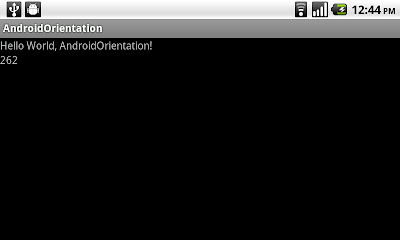
OrientationEventListener(方向事件監聽器)是一個當方向發生變化時, 從 SensorManager(傳感器管理程序)接收通知的輔助類.
相關文章:
- Display.getRotation()

package com.AndroidOrientation;

import android.app.Activity;
import android.content.Context;
import android.hardware.SensorManager;
import android.os.Bundle;
import android.view.OrientationEventListener;
import android.widget.TextView;
import android.widget.Toast;

public class AndroidOrientation extends Activity{

TextView orientation;
MyOrientationEventListener myOrientationEventListener;

   /** Called when the activity is first created. */
   @Override
   public void onCreate(Bundle savedInstanceState) {
       super.onCreate(savedInstanceState);
       setContentView(R.layout.main);
       orientation = (TextView)findViewById(R.id.orientation);

       myOrientationEventListener =
        new MyOrientationEventListener(this, SensorManager.SENSOR_DELAY_NORMAL);

       if (myOrientationEventListener.canDetectOrientation()){
        myOrientationEventListener.enable();
       }else{
        Toast.makeText(AndroidOrientation.this,
          "Can't Detect Orientation!",
          Toast.LENGTH_LONG).show();
       }
   }

   @Override
protected void onDestroy() {
 // TODO Auto-generated method stub
 super.onDestroy();
 myOrientationEventListener.disable();
}

class MyOrientationEventListener extends OrientationEventListener{

 public MyOrientationEventListener(Context context, int rate) {
  super(context, rate);
  // TODO Auto-generated constructor stub
 }

 @Override
 public void onOrientationChanged(int arg0) {
  // TODO Auto-generated method stub
  orientation.setText(String.valueOf(arg0));
 }

   }
}
<?xml version="1.0" encoding="utf-8"?>
<LinearLayout xmlns:android="http://schemas.android.com/apk/res/android"
   android:orientation="vertical"
   android:layout_width="fill_parent"
   android:layout_height="fill_parent"
   >
<TextView
   android:layout_width="fill_parent"
   android:layout_height="wrap_content"
   android:text="@string/hello"
   />
<TextView
   android:id="@+id/orientation"
   android:layout_width="fill_parent"
   android:layout_height="wrap_content"
   />
</LinearLayout>
相關文章:
- Display.getRotation()
Android 3.1 平台的軟件開發工具包(SDK)
谷歌在Google I/O 2011宣布推出 Android 3.1 平台的軟件開發工具包(SDK)。 Android 3.1是一個漸進的升級版,其依據是在 Android 3.0 平板電腦(tablet)採用的用戶界面和功能。它為用戶和開發人員增加了一些新的功能,其中包括:
詳情,請參閱 Android 3.1 Platform Highlights.
來源
- http://android-developers.blogspot.com/2011/05/android-31-platform-new-sdk-tools.html
- 開放式附件應用程序接口(Open Accessory API)。這個新的API提供了一種 Android應用程式與廣泛配件(如音樂器材,運動設備,機器人系統,等等)之間的整合和互動。
- USB主機應用程序接口(USB host API)。支持USB主機模式,應用程序現在可以管理連接的USB外圍設備,如音頻設備。輸入設備,通信設備,等等。
- 滑鼠,遊戲桿,及遊戲手柄輸入。Android 3.1擴展了輸入事件系統,支持各種新的輸入來源和活動事件,如滑鼠,軌跡球,搖桿,遊戲手柄等。
- 可調整大小的屏幕部件(Home screen widgets)。開發人員現在可以創建可調整水平,垂直尺寸的屏幕部件。
- 當外部連接移除照相機時, 媒體傳輸協議(Media Transfer Protocol, MTP)應用程序現在可以收到通知, 以及在這些設備上管理和存儲文件, 並傳輸文件和元數據。
- 音頻的實時傳輸協議應用程序接口(Real-time Transport Protocol, RTP API)。開發人員可以直接管理按需求或交互式數據流,以啟用網絡電話,一鍵通,會議和音頻流。
詳情,請參閱 Android 3.1 Platform Highlights.
來源
- http://android-developers.blogspot.com/2011/05/android-31-platform-new-sdk-tools.html
2011年5月8日星期日
通過繪圖緩存(DrawingCache)捕獲屏幕顯示
當點擊按鈕, 本應用程序會通過繪圖緩存(DrawingCache)捕獲屏幕顯示, 與顯示在圖像視圖中.


package com.AndroidScreenCapture;

import android.app.Activity;
import android.graphics.Bitmap;
import android.os.Bundle;
import android.view.View;
import android.widget.Button;
import android.widget.ImageView;

public class AndroidScreenCapture extends Activity {

 View myscreen;
 ImageView viewScreen;

    /** Called when the activity is first created. */
    @Override
    public void onCreate(Bundle savedInstanceState) {
        super.onCreate(savedInstanceState);
        //setContentView(R.layout.main);
        setContentView(R.layout.main);
        myscreen = (View)findViewById(R.id.myscreen);
        Button buttonCapture = (Button)findViewById(R.id.capture);
        viewScreen = (ImageView)findViewById(R.id.screenview);

        buttonCapture.setOnClickListener(new Button.OnClickListener(){

   @Override
   public void onClick(View arg0) {
    // TODO Auto-generated method stub
    myscreen.setDrawingCacheEnabled(true);
          Bitmap bmScreen = myscreen.getDrawingCache();
          viewScreen.setImageBitmap(bmScreen);
   }});
    }
}
<?xml version="1.0" encoding="utf-8"?>
<LinearLayout xmlns:android="http://schemas.android.com/apk/res/android"
    android:orientation="vertical"
    android:layout_width="fill_parent"
    android:layout_height="fill_parent"
    android:id="@+id/myscreen"
    >
<TextView
    android:layout_width="fill_parent"
    android:layout_height="wrap_content"
    android:text="@string/hello"
    />
<Button
    android:id="@+id/capture"
    android:layout_width="fill_parent"
    android:layout_height="wrap_content"
    android:text="Capture Screen!"
    />
<ImageView
    android:id="@+id/screenview"
    android:layout_width="fill_parent"
    android:layout_height="fill_parent"
    />
</LinearLayout>
2011年5月5日星期四
處理語音識別返回的字符串數組列表
從上文"啟動 Android 的語音識別(Speech Recognition)功能"可以注意到所返回的結果是一個字符串數組列表(StringArrayList). 我們可以使用列表視圖(ListView)顯示所有返回的結果, 以供用戶選擇最正確的答案.


package com.AndroidSpeechRecognition;

import java.util.ArrayList;

import android.app.Activity;
import android.content.Intent;
import android.os.Bundle;
import android.speech.RecognizerIntent;
import android.view.View;
import android.widget.AdapterView;
import android.widget.ArrayAdapter;
import android.widget.Button;
import android.widget.ListView;
import android.widget.TextView;
import android.widget.AdapterView.OnItemClickListener;

public class AndroidSpeechRecognition extends Activity {

 private static final int RQS_VOICE_RECOGNITION = 1;
 TextView textResult;
 ListView listResult;

   /** Called when the activity is first created. */
   @Override
   public void onCreate(Bundle savedInstanceState) {
       super.onCreate(savedInstanceState);
       setContentView(R.layout.main);
       Button buttonSpeech = (Button)findViewById(R.id.Speech);
       textResult = (TextView)findViewById(R.id.Result);
       listResult = (ListView)findViewById(R.id.ResultList);

       buttonSpeech.setOnClickListener(new Button.OnClickListener(){

   @Override
   public void onClick(View arg0) {
    // TODO Auto-generated method stub
    Intent intent = new Intent(RecognizerIntent.ACTION_RECOGNIZE_SPEECH);
       intent.putExtra(RecognizerIntent.EXTRA_LANGUAGE_MODEL,
           RecognizerIntent.LANGUAGE_MODEL_FREE_FORM);
       intent.putExtra(RecognizerIntent.EXTRA_PROMPT,
           "Start Speech");
       startActivityForResult(intent, RQS_VOICE_RECOGNITION);
   }});
   }

 @Override
 protected void onActivityResult(int requestCode, int resultCode, Intent data) {
  // TODO Auto-generated method stub
  if(requestCode == RQS_VOICE_RECOGNITION){
   if(resultCode == RESULT_OK){

    ArrayList<String> result = data.getStringArrayListExtra(RecognizerIntent.EXTRA_RESULTS);
    String firstMatch = (String)result.get(0);
    textResult.setText(firstMatch);

    ArrayAdapter<String> arrayAdapter = new ArrayAdapter<String>(this,
               android.R.layout.simple_list_item_1, result);
    listResult.setAdapter(arrayAdapter);

    listResult.setOnItemClickListener(listResultOnItemClickListener);
   }
  }
 }

 private OnItemClickListener listResultOnItemClickListener
 = new ListView.OnItemClickListener(){

  @Override
  public void onItemClick(AdapterView<?> adapter, View view, int position,
    long id) {
   // TODO Auto-generated method stub
   String selectedResult = adapter.getItemAtPosition(position).toString();
   textResult.setText(selectedResult);
  }};

}
啟動 Android 的語音識別(Speech Recognition)功能
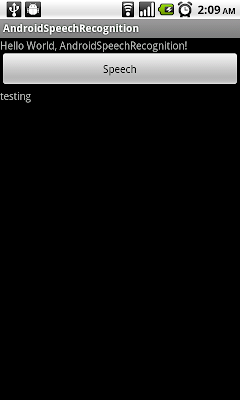
應用軟件可以通過 RecognizerIntent, 啟動 Android 的語音識別(Speech Recognition)功能.

例子:
相關文章:
- 處理語音識別返回的字符串數組列表


例子:
package com.AndroidSpeechRecognition;

import java.util.ArrayList;

import android.app.Activity;
import android.content.Intent;
import android.os.Bundle;
import android.speech.RecognizerIntent;
import android.view.View;
import android.widget.Button;
import android.widget.TextView;

public class AndroidSpeechRecognition extends Activity {

 private static final int RQS_VOICE_RECOGNITION = 1;
 TextView textResult;

    /** Called when the activity is first created. */
    @Override
    public void onCreate(Bundle savedInstanceState) {
        super.onCreate(savedInstanceState);
        setContentView(R.layout.main);
        Button buttonSpeech = (Button)findViewById(R.id.Speech);
        textResult = (TextView)findViewById(R.id.Result);

        buttonSpeech.setOnClickListener(new Button.OnClickListener(){

   @Override
   public void onClick(View arg0) {
    // TODO Auto-generated method stub
    Intent intent = new Intent(RecognizerIntent.ACTION_RECOGNIZE_SPEECH);
       intent.putExtra(RecognizerIntent.EXTRA_LANGUAGE_MODEL,
           RecognizerIntent.LANGUAGE_MODEL_FREE_FORM);
       intent.putExtra(RecognizerIntent.EXTRA_PROMPT,
           "Start Speech");
       startActivityForResult(intent, RQS_VOICE_RECOGNITION);
   }});
    }

 @Override
 protected void onActivityResult(int requestCode, int resultCode, Intent data) {
  // TODO Auto-generated method stub
  if(requestCode == RQS_VOICE_RECOGNITION){
   if(resultCode == RESULT_OK){

    ArrayList<String> result = data.getStringArrayListExtra(RecognizerIntent.EXTRA_RESULTS);
    String firstMatch = (String)result.get(0);
    textResult.setText(firstMatch);
   }
  }


 }
}
<?xml version="1.0" encoding="utf-8"?>
<LinearLayout xmlns:android="http://schemas.android.com/apk/res/android"
    android:orientation="vertical"
    android:layout_width="fill_parent"
    android:layout_height="fill_parent"
    >
<TextView
    android:layout_width="fill_parent"
    android:layout_height="wrap_content"
    android:text="@string/hello"
    />
<Button
    android:id="@+id/Speech"
    android:layout_width="fill_parent"
    android:layout_height="wrap_content"
    android:text="Speech"
    />
<TextView
    android:id="@+id/Result"
    android:layout_width="fill_parent"
    android:layout_height="wrap_content"
    />
</LinearLayout>
相關文章:
- 處理語音識別返回的字符串數組列表
訂閱:
文章 (Atom)
